Well, after making my silver fountain picture the other day and having gone to all the work to create a three-second-long fluid simulation for it (which probably took half an hour to calculate) only to use just one of the 75 resulting frames, I decided it would be fitting to make an actual video, since fountains are generally known more for their liquid nature.
I re-modeled the fountain itself since I wasn't quite satisfied with how it looked (which included making it an actual object with volume rather than a paper-thin shell), calculated a full five seconds of fluid simulation, then rendered the entire thing at 25 frames per second, 300 cycles per frame. I'm not sure how long the entire process took because I did it over night, only that it took less than ten hours.
I should explain that the reason I can get such realistically rendered water is because of Blender's new (as of version 2.61 from last December) internal rendering engine called Cycles. Unlike the original internal render mechanism, Cycles has no set “end” point. Instead, it simply renders a predetermined number of cycles, each cycle improving the picture. Each cycle does not, however, improve it by the same amount, leading to a point of diminishing returns after which additional cycles cost more in time than they are worth in aesthetic improvement. What that point is, of course, is entirely subjective.
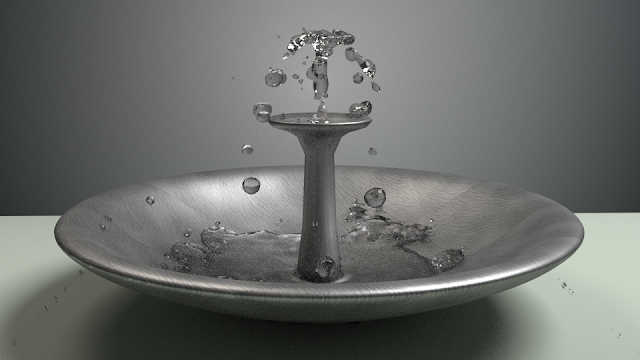 |
| A larger version of frame 43 from the video, 300 cycles. Took 13 minutes 50 seconds to render. |
The existence of this point leads to a trade-off between “How good do I want this picture to look?” and “How much time am I willing to devote to making it look good?”. This becomes especially critical in video rendering when you're rendering hundreds of frames. For instance, for my single picture a few days ago, I let it render for 1,000 cycles, which took two hours and twenty-one minutes. Obviously I can't do that for each of the 125 frames I was rendering for this video, but I still wanted it to look decent, so I compromised and rendered 300 cycles for each frame. If you look closely (or maybe not all that closely, I don't know) you can definitely spot the difference.
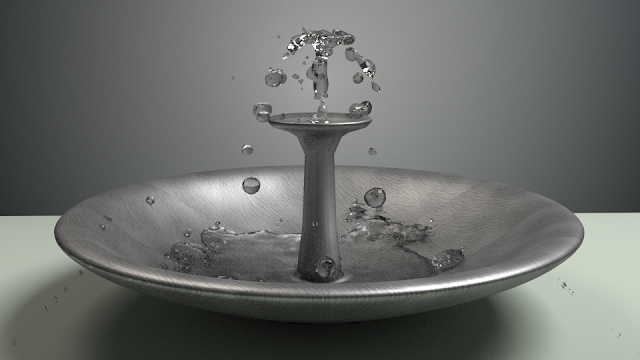 |
| Similar to above, but with 500 cycles. Not as dramatic a difference as I'd hoped, but you can see that the water in the basin and the shadow looks less noisy than the 300 cycles version. This one took 23 and a half minutes to render. |
I do think that Cycles is a very cool development for Blender (although it forces a re-learning of the texturing and lighting process almost from the ground up), and it certainly works well for single pictures when you can let it go for a long time (it's not uncommon to see artists using such open-ended renderers letting them run for 5,000 cycles or more). I've got some ideas for future artwork of a more substantial kind, so keep an eye out for it in the future.


